Finally! Virtual Devices Are Here!
Dear valued eWeLink advanced plan member, we're pleased to inform you that in April, we've released the latest updates for both eWeLink WEB (a powerful web management platform) and eWeLink CAST (a customizable smart home dashboard). These updates, available exclusively to members, are designed to enhance your experience. Here's what's new:
eWeLink WEB
1. Virtual Devices:
Ever felt frustrated that not all your eWeLink devices can sync with platforms like Alexa or Google? You're not alone. Many users face this hurdle—until now!
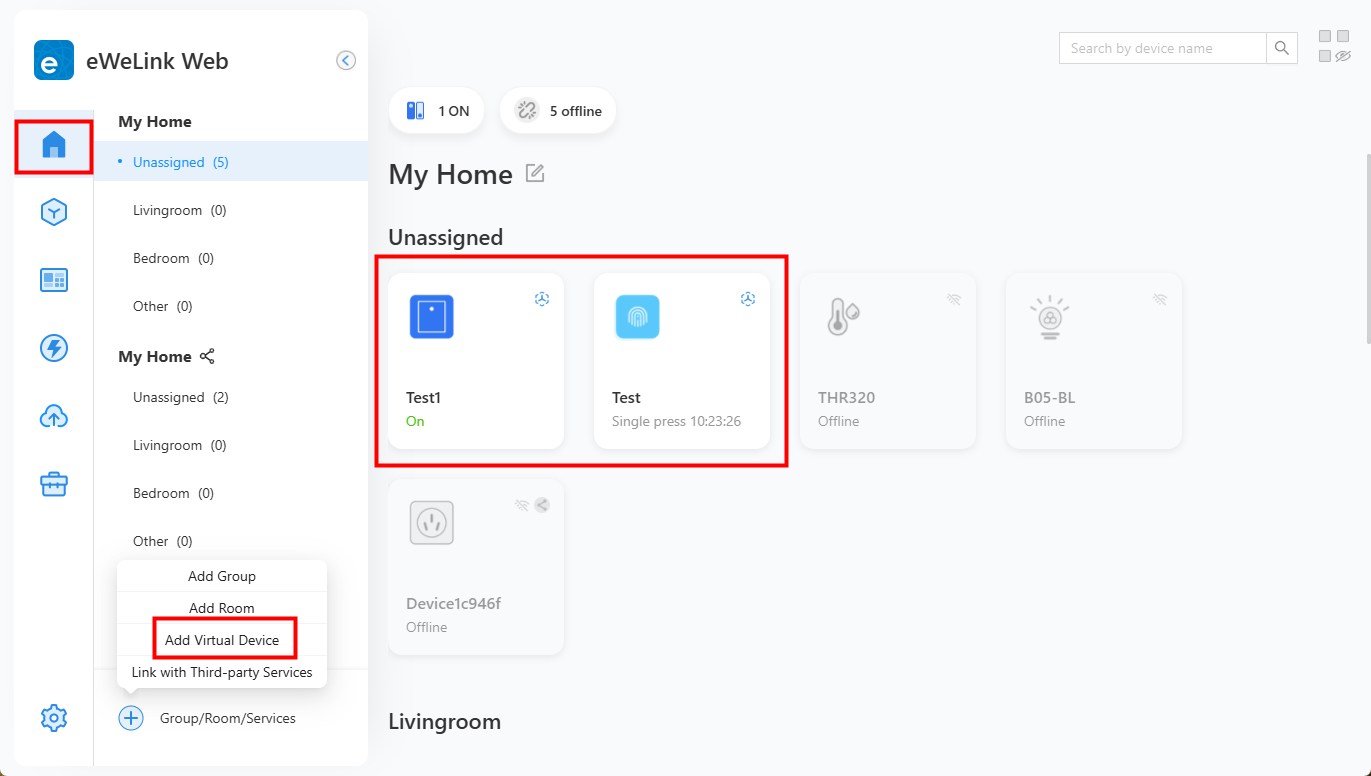
Introducing this new feature located in Home that allows you to create Virtual Switches and Virtual Buttons—act as bridge to control devices through Alexa/Google/SmartThings/IFTTT that normally wouldn't work together.
How it works:
- Create a Virtual Switch/Button in eWeLink Web shown above.
- Adding a scene to bind it to your physical devices that can't natively sync with third-party platforms.
- Sync the Virtual Device to Alexa or other platform, then set up routines or scenes for it in the corresponding app.
Example magic:
✅ Turn off all lights when you ask Alexa close "Virtual Switch".
✅ Single-tap a "Virtual Button" to turn on lights; double-tap to shut them.
In all, virtual devices shatters the physical limits of smart devices, unlocking seamless cross-platform control like never before.
Experience Virtual Devices on eWeLink WEB >
2. Enhanced Sharing Management
In the Tools section, both Device Sharing and Home Sharing features have been significantly enhanced in this update. In the previous version, the Sharing Management we introduced primarily served as a viewer, letting you check all your shared and received information in one place—but that was just the beginning. Now you can:
- Easily add multiple users to your home via Tools > Home Sharing at one click, saving time and streamlining the process.
- Share multiple devices with multiple users simultaneously via Tools > Device Sharing, eliminating repetitive actions for easier management.
Dicover Sharing Management on eWeLink WEB >
3. New Device Support:
Now compatible with the following devices, expanding your smart home ecosystem:
-SONOFF Zigbee Smart Curtain Motor
-Virtual Switches & Virtual Buttons
eWeLink CAST
New Devices Support & Corresponding Scenes and Scene Logs Support:
-SONOFF Zigbee Smart Curtain Motor
-Virtual Switches & Virtual Buttons
🎉Good news! We're excited to announce the launch of our Telegram group for eWeLink members: https://t.me/+KxSpNBtnY9I2NzRl
Join us to engage in lively discussions, share your experiences, and get real-time support from both our team and fellow enthusiasts! Or scan the QR code below to join our Telegram group and be a part of this amazing community:
Also feel free to drop by our eWeLink forum and chat away: https://forum.ewelink.cc/