Effortless Smart Device Control While Monitoring Your Camera Live Feed
Have you ever wished to control your smart devices while keeping an eye on your security cameras? With the latest eWeLink App V5.14 update, you can now do so! This new feature enables seamless integration of linked devices within the Insight -> Camera Live View section, allowing you to operate smart plugs, switches, and more—all from the same screen.
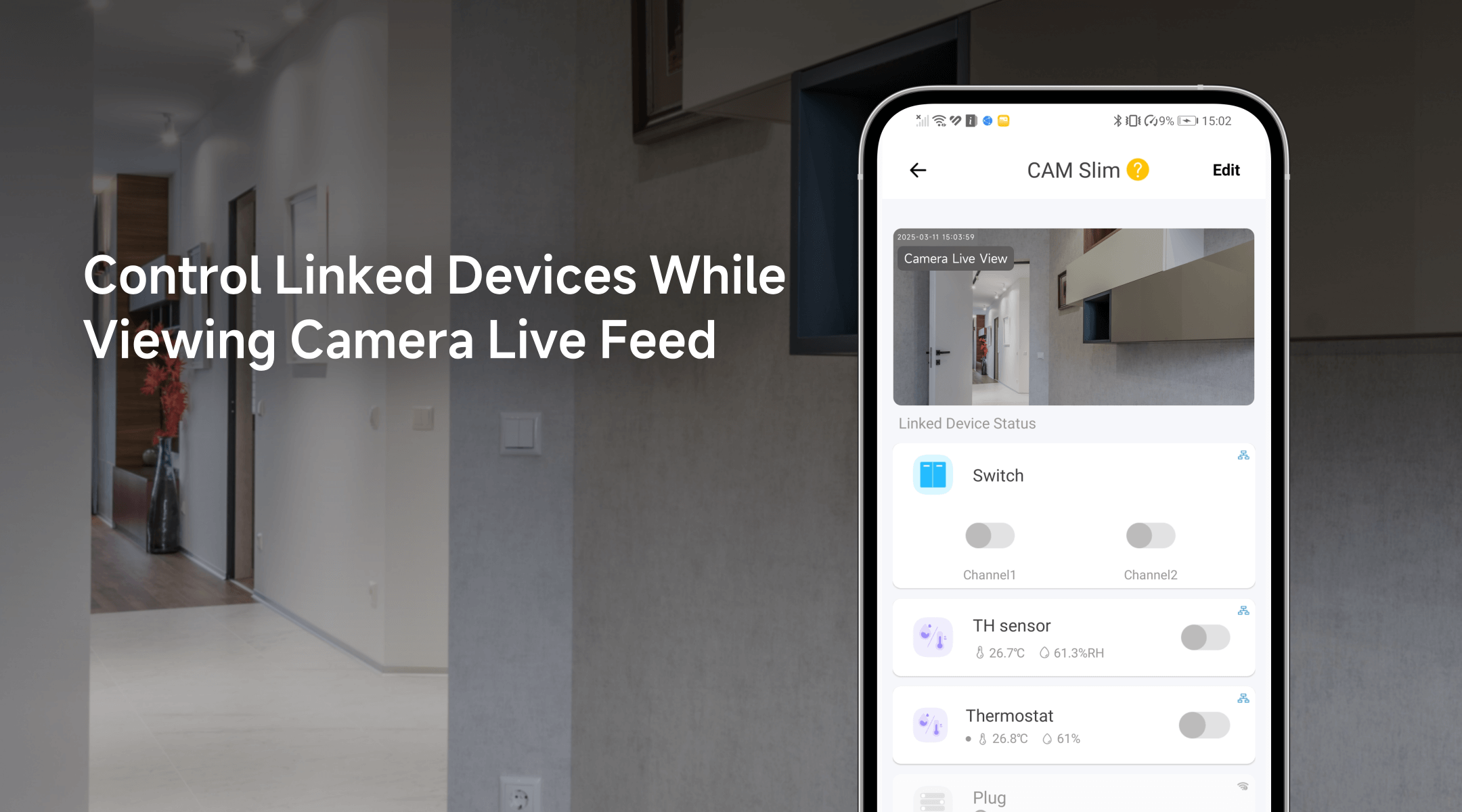
What Makes This Feature So Convenient?
Imagine you're watching your front door camera and notice a guest arriving at night. Instead of switching screens or navigating through the app, you can now instantly turn on the porch light or unlock the smart door lock with a single tap. Whether it's activating a switch, adjusting the thermostat, or controlling any other connected device, this update ensures a smoother and more efficient smart home experience.
Here are a few real-world scenarios where this function adds value:
- Greet guests with ease – See someone at your doorstep? Turn on the entryway lights or unlock the smart lock directly from the live feed.
- Enhance home security – Watching your camera live feed and notice suspicious movement outside? Instantly activate your outdoor lights with a tap on the same screen to deter unwanted visitors.
- Remote control without disruption – Monitor your baby's room while adjusting the temperature or turning on a soothing nightlight without leaving the camera view.
Newly Supported Devices
This feature is now compatible with a wide range of smart devices. Below are some of the supported categories and examples:
|
Device Type |
Eligible Device Models (Examples) |
|
Single-Channel Plug |
SONOFF BASIC_R3 SONOFF MINI SONOFF RF_R2 SONOFF S20R1 SONOFF S26 SONOFF S31 Lite SONOFF S55R1 SONOFF S30 AIB-xU1 CKCP-001 |
|
Single-Channel Plug_Support 2.4G eWeLink-Remote |
SONOFF BASICR4 SONOFF MINI-D SONOFF MINIR3 SONOFF MINIR4 SONOFF S40 lite BL1-S04-01 CK-BL602-4SW-AY |
|
DIY Smart Switch |
SONOFF Basic SONOFF RF SONOFF SV |
|
Single-Channel Switch |
SONOFF RF R2 SONOFF T1 1C SONOFF Touch SONOFF TX1C |
|
Four-Channel Plug |
SONOFF 4CH |
|
Power detection Plug |
SONOFF IW100_US SONOFF IW101_US SONOFF Pow R2 SONOFF POWR3 SONOFF S31 GSA-D76 PSA-X67-GL |
|
Three-Channel Switch |
SONOFF T1 3C SONOFF TX3C CKA-DM4-GL |
|
Dual-Channel Switch |
SONOFF T1 2C SONOFF TX2C |
|
Thermostat |
SONOFF S22_CN SONOFF TH10 SONOFF TH16 CK-BL602-TC-01 PSA-BHA-GL |
|
Dual-Channel Plug |
SONOFF DUALR2 CKW04-2C |
|
Multi-Functional Dual-Channel Power Detection Switch |
SONOFF DUALR3 E32-2SW-P0 |
|
Power Monitoring Plug Overload Alert - Multi-Channel Protocols |
SONOFF S40 SONOFF S40TPA SONOFF S40TPB CK-BL602-SWP1-01 |
|
Single-Channel Plug-Multi-channel version |
SONOFF Micro CKAM1 |
|
(POWCT)POWR3 - with LCD Screen |
SONOFF POWCT SONOFF POWR316 SONOFF POWR320D SONOFF S60TPF SONOFF S60TPG SN-ESP32D0-POWR3-01 |
|
Temperature & Humidity Monitoring Switch_Support with History Feature |
SONOFF TH16R3 SONOFF THR316 SONOFF THR320 CK-BL602-W302SE10-01 |
|
RGBCW LED Bulb Light, with 2.4G eWeLink-Remote |
SONOFF B05-BL BL1-ALL-LED CK-BL602-5PWM-01 |
|
HMI Wall Switch |
SONOFF NSPanel E32-MSW-NX |
|
Four-Channel Plug_Support 2.4G eWeLink-Remote |
BL1-S04-01 CK-BL602-4SW-HS |
|
Zigbee Smart Switch |
SONOFF S26R2ZBTPG |
|
Smart Plug with Power Monitoring |
SONOFF Pow |
|
Curtain Motor |
CK-BL602-DDCL-01 |
The list includes single-channel, dual-channel, multi-channel devices, and more, ensuring that no matter the type of smart device you use, you can enjoy the convenience of direct control from your camera live feed.
How to Get Started
- Open the eWeLink App and navigate to Insight -> Camera Live View.
- Select a camera and tap the Edit option.
- Choose the devices you want to control alongside your live feed.
- Enjoy seamless operation—no screen switching needed!
With this powerful new feature, eWeLink continues to make smart home automation simpler, more intuitive, and more efficient. Update your app today and experience effortless control at your fingertips!
Stay Connected with eWeLink
To stay updated on the latest eWeLink developments and smart home tips, connect with us through our active online channels:
Forum: eWeLink Forum
Facebook: https://www.facebook.com/ewelink.support
Twitter: https://twitter.com/eWeLinkapp
YouTube: https://www.youtube.com/c/eWeLinkSmartHome
Website: https://ewelink.cc/