What's New in eWeLink App V5.22
eWeLink App V5.22 arrives with powerful upgrades designed to make your smart home not only more intelligent but also more connected to the emerging world of AI automation. This release unlocks the eWeLink MCP Server for Prime subscribers, enhances membership benefits with higher limits for virtual devices, thermostat plugins, and device sharing, and introduces clearer operation logs to show exactly which scene triggered an action.
Let's dive into the highlights.
Introducing the eWeLink MCP Server—Natural-Language Control Meets Your Smart Home
One of the biggest highlights of V5.22 is the debut of the eWeLink MCP Server, now available to all Prime Plan subscribers.
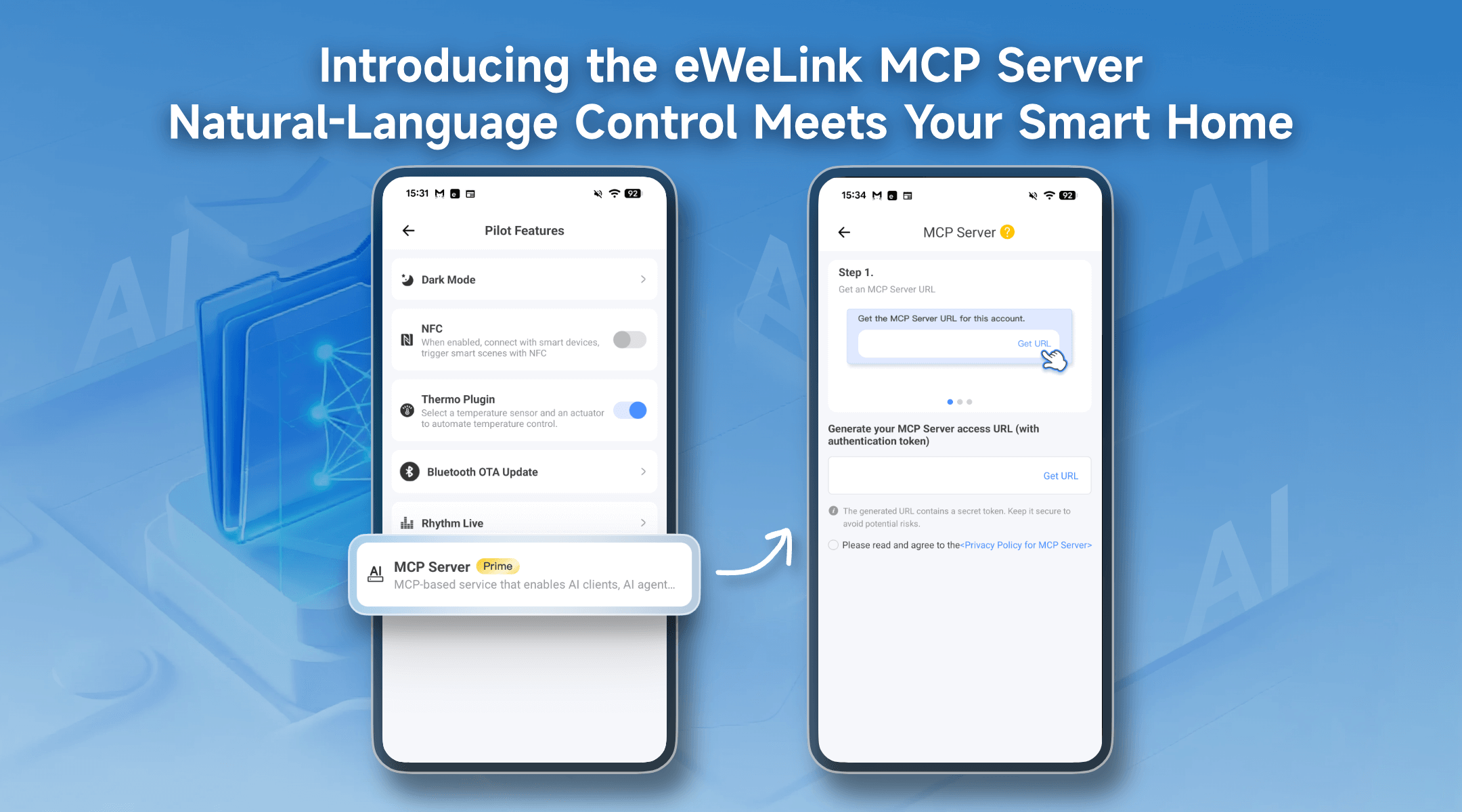
What is the eWeLink MCP Server?
The eWeLink MCP Server is a new, exclusive service for Prime Plan subscribers that bridges the gap between advanced AI assistants and your IoT devices. By leveraging the Model Context Protocol (MCP), it allows compatible AI clients and agents to seamlessly integrate with and control your eWeLink-supported devices using simple, natural language commands.
Imagine telling your AI assistant, "It's getting chilly in the living room," and having it automatically turn on your heater. Or saying, "Good night," to trigger a scene—locking the door, turning off the lights, and adjusting the thermostat—all through a conversational interface. The MCP Server translates your intent into precise device actions.
How to Enable and Use eWeLink MCP Server
Step 1—Enable MCP Server in the App
Go to:
eWeLink App → Profile → Pilot Features → MCP Server
Step 2—Generate Your MCP Server URL
Once enabled, you can get a unique MCP Server URL.
- Copy URL: Provide it to your AI client or AI agent
- Refresh Token: Generate a new URL if the current one expires
- Revoke Authorization: Instantly disable all AI access when needed, ensuring full privacy and security
Step 3—Configure Your AI Client
Configure the MCP Server in your AI client and activate the integration.
Your AI assistant can now control your eWeLink-supported devices.
Currently Supported Devices (More coming soon!) :
We're launching with comprehensive support for switches and plugs, including popular models like
|
Device Type |
Eligible Device Models (Examples) |
|
Single-Channel Plug |
SONOFF BASIC_R3 SONOFF MINI SONOFF RF_R2 SONOFF S20R1 SONOFF S26 SONOFF S31 Lite SONOFF S55R1 SONOFF S30 AIB-xU1 CKCP-001 |
|
Single-Channel Plug_Support 2.4G eWeLink-Remote |
SONOFF BASICR4 SONOFF MINIR3 SONOFF MINIR4 SONOFF S40 lite CK-BL602-4SW-AY |
|
DIY Smart Switch |
SONOFF Basic SONOFF RF SONOFF SV |
|
Single-Channel Switch |
SONOFF RF R2 SONOFF T1 1C SONOFF Touch SONOFF TX1C |
|
Four-Channel Plug |
SONOFF 4CH |
|
Power detection Plug |
SONOFF IW100_US SONOFF IW101_US SONOFF Pow R2 SONOFF POWR3 SONOFF S31 PSA-X67-GL |
|
Three-Channel Switch |
SONOFF T1 3C SONOFF TX3C |
|
Dual-Channel Switch |
SONOFF T1 2C SONOFF TX2C |
|
Temp & Humi Monitoring Smart Switch |
SONOFF S22_CN SONOFF TH10 SONOFF TH16 PSA-BHA-GL |
|
Dual-Channel Plug |
SONOFF DUALR2 |
|
Power Monitoring Plug Overload Alert - Multi-Channel Protocols |
SONOFF S40 SONOFF S40TPA SONOFF S40TPB |
|
(POWCT)POWR3 - with LCD Screen |
SONOFF POWCT SONOFF POWR316 SONOFF POWR320D SONOFF S60TPF SONOFF S60TPG |
|
Temperature & Humidity Monitoring Switch_Support with History Feature |
SONOFF TH16R3 SONOFF THR316 SONOFF THR320 SN-ESP32D0-THR3-01 |
|
Single-Channel Plug-Multi-channel version |
SONOFF Micro |
|
Four-Channel Plug_Support 2.4G eWeLink-Remote |
BL1-S04-01 CK-BL602-4SW-HS |
Prime Members Get More: Virtual Devices, Thermostat plugins, and Sharing Upgraded
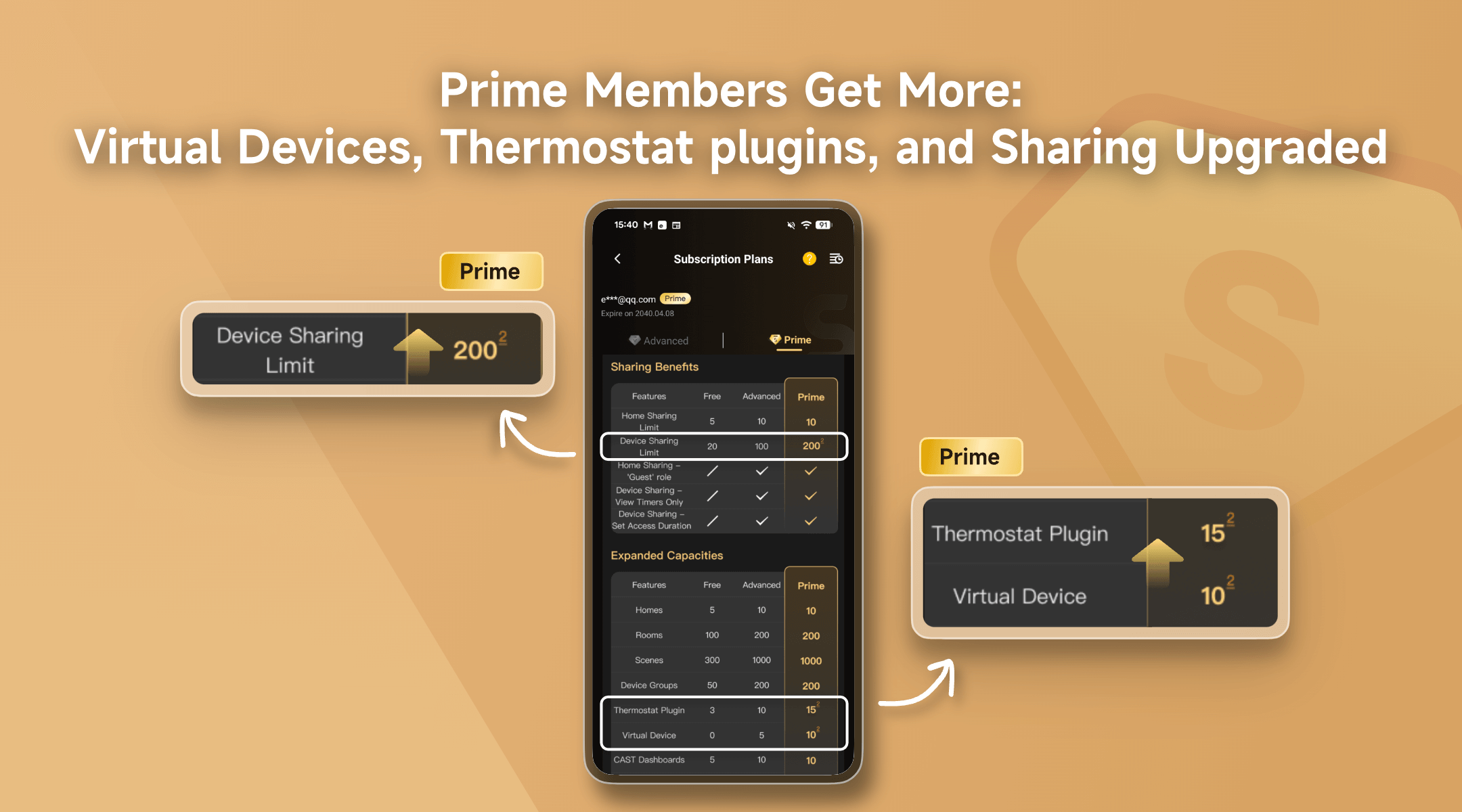
V5.22 also enhances the value of Prime membership by increasing the limits for virtual devices, thermostat plugins, and device sharing.
|
Feature |
Free |
Advanced |
Prime |
|
Virtual Devices |
0 |
5 |
10 |
|
Thermostat Plugins |
3 |
10 |
15 |
|
Device Sharing Limits |
20 |
100 |
200 |
These upgrades provide the flexibility to create more intricate automations, manage more climate zones, and collaborate with more family members or colleagues.
Operation Logs Now Show Scene Names for Clearer Automation Tracking
Your smart home is full of automated actions, but what triggered them? We've upgraded the operation logs to give you complete clarity, based directly on user feedback.
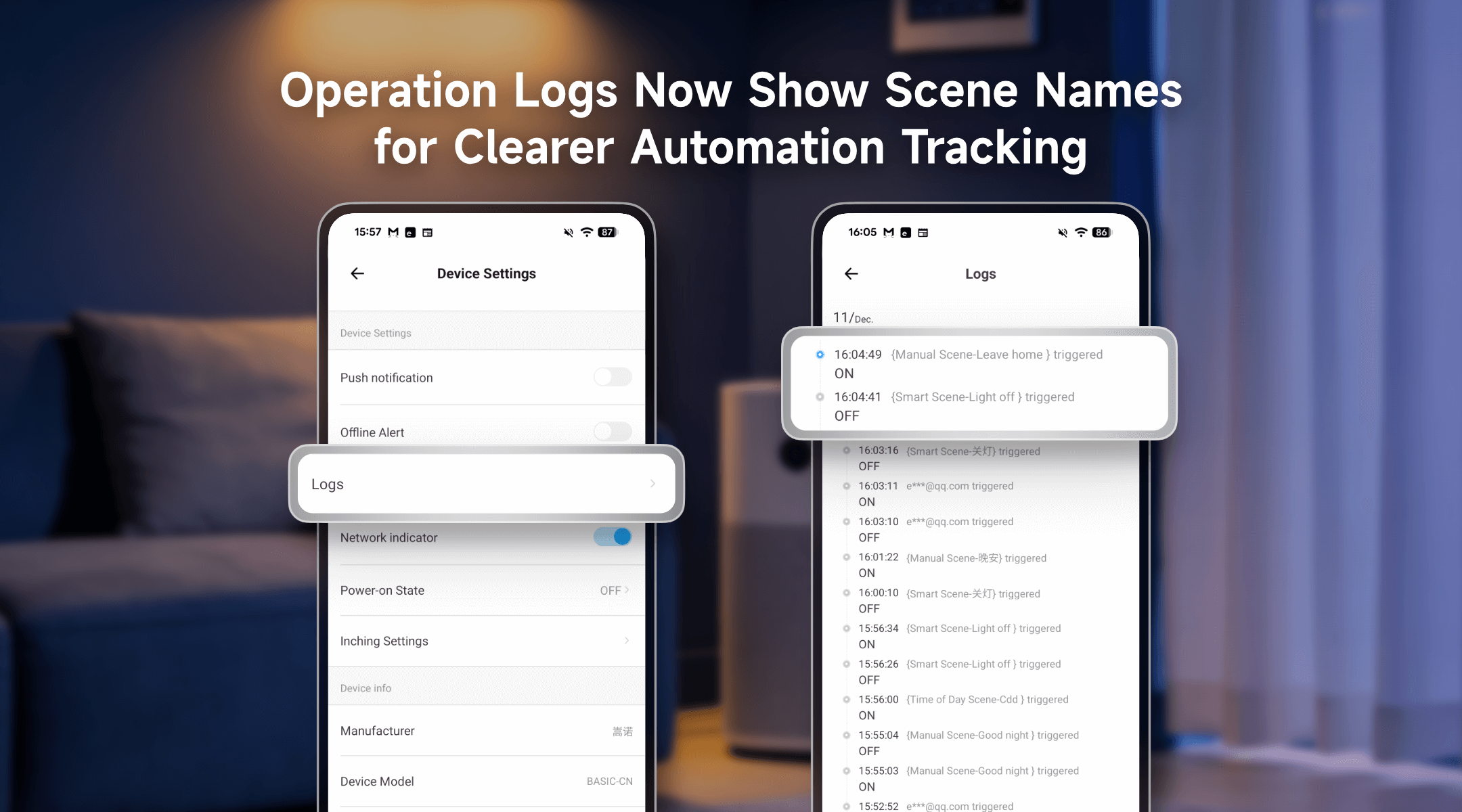
What's Changed: From Generic to Specific
Previously, when a scene triggered a device, the log entry would simply show a generic type like "Manual Scene" or "Smart Scene." While this told you how it was triggered, it didn't tell you which specific scene was responsible.
Now: Clear Insight into Every Action
For eligible devices—including Plugs, Switches, Lights, Curtain Motors, and Temperature & Humidity Monitors—the logs now reveal the exact scene name that initiated the action. Simply go to Device Settings > Logs to see this enhanced detail.
Example in Action:
{Manual Scene-Leave home} triggered
{Smart Scene-Light off} triggered
This precise labeling makes it easy to verify that your "Good Night" scene worked correctly or to debug why a device turned on unexpectedly by identifying the specific automation involved.
Update to eWeLink App V5.22 today to unlock a new dimension of conversational control with the MCP Server, enjoy expanded membership capabilities, and benefit from clearer, more informative device logs. With these upgrades, your smart home becomes more intelligent, more transparent, and easier to manage than ever—bringing you one step closer to a truly intuitive and understandable smart living experience.
The new version has been submitted to Google Play and will roll out gradually over the next few days. iOS users—hang tight, the update is expected to arrive by the end of December.
Stay Connected with eWeLink
To stay updated on the latest eWeLink developments and smart home tips, connect with us through our active online channels:
Forum: eWeLink Forum
Facebook: https://www.facebook.com/ewelink.support
X: https://x.com/eWeLinkapp
YouTube: https://www.youtube.com/c/eWeLinkSmartHome
Website: https://ewelink.cc/